I Buy a New Computer
December 2025
My current desktop computer is
over 5 years old, and is showing its age. For some time I have
been planning to build a new one with updated specs to improve doing
tasks like mechanical design using CAD, and doing video editing, which I
seem to be doing more and more often. It also would certainly not
hurt the performance of my flight simulators!
I had mentally developed a list of features I want such as a relatively high end AMD processor (CPU), a mid to higher level graphics adapter card (GPU), 32GB of RAM, and a new case to house it all. The other items to be chosen at build time. I then determined i would need budget of about $2000 give or take.
Then something disastrous happened:
Many companies dove headfirst into artificial intelligence (AI). As AI requires a lot of computing power, they all started building new giant data centers. As a result, almost the entire output of memory and related chips from the computer chip manufacturers is being bought up for these new data centers. Prices of RAM rose about 400% in 3 months, and even at that price was (and is) hard to find. Other components like graphics cards and solid state drives also became much more expensive. There went my budget!
In early December while I was at Costco, I looked at their computers. They had an MSI Aegis ZS2 gaming PC for sale which met or exceeded all my desired specs. It listed for about $2600, but was still on their Black Friday sale price of $2200. I went home and re-checked prices for just the primary components for my self built system, and they were now more than than the complete Costco system, which I went back and bought the next day! A friend of mine later priced all the components on Amazon, and discovered that I would have to spend over $3400 now to build this system myself! Thank you MSI for building this system with components you obtained prior to the massive price increases!


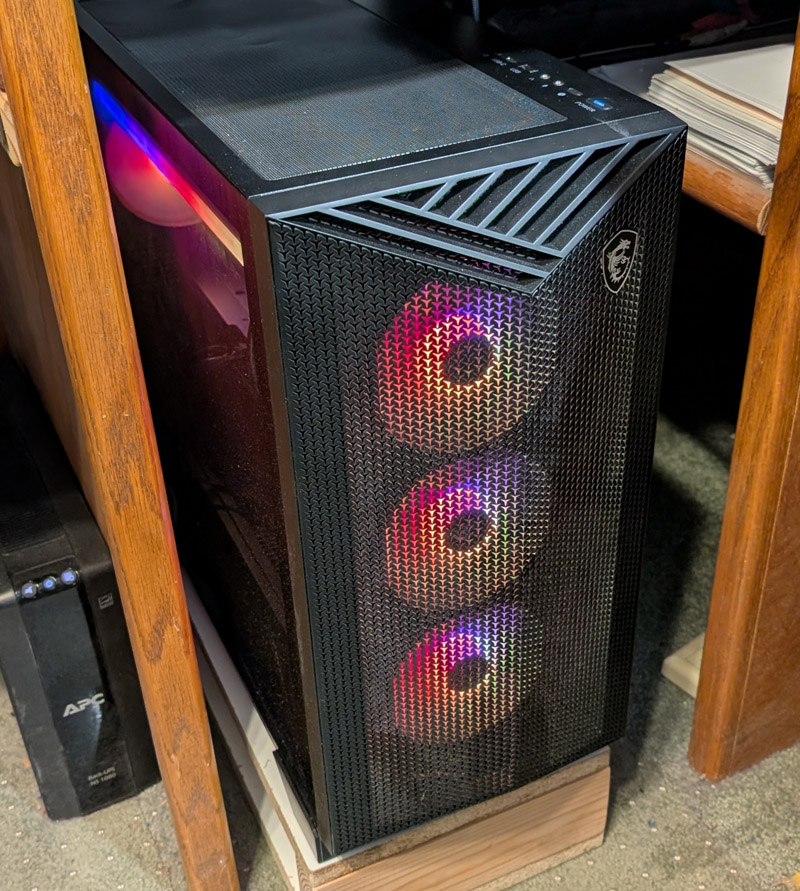
This is my new computer. It is built by MSI, one of the better suppliers of computer hardware and accessories,
and contains many MSI components.
A summary of my new system is:
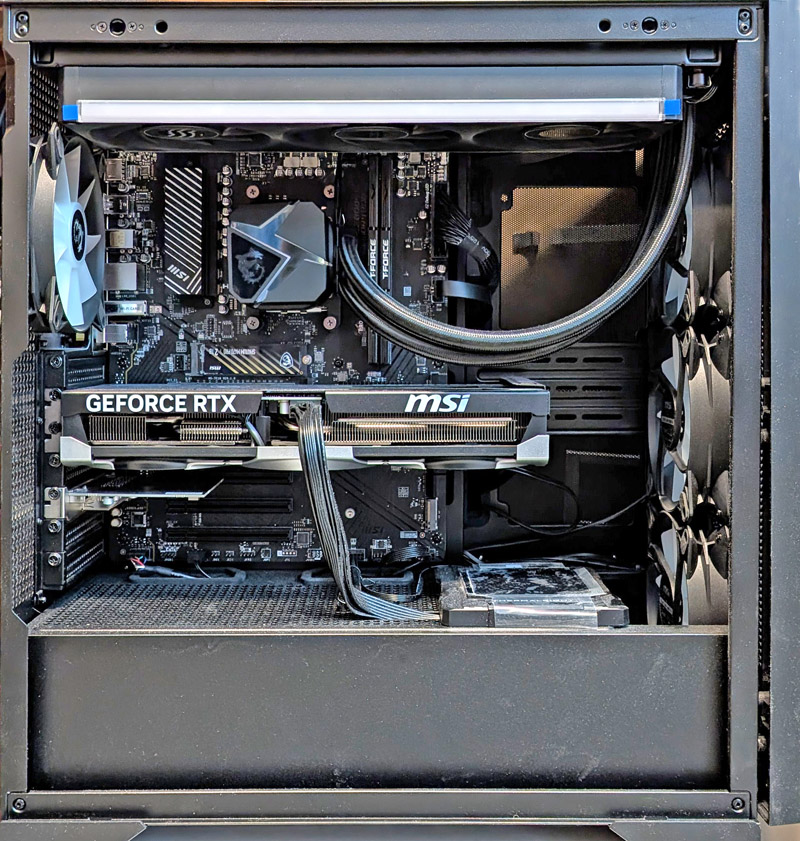
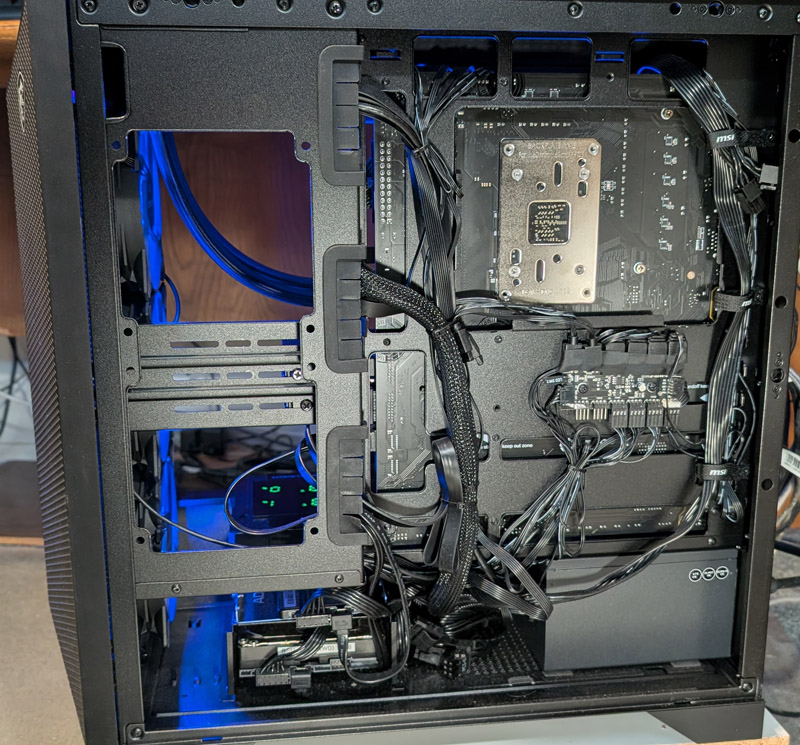
The left picture shows the innards of the system. At the top is the radiator for the liquid cooling system with hoses going down to the CPU cooling block.
There are 3 fans on the radiator, 3 more bringing in cool air from the front, and one pushing air out the rear. all the fans have RGB lighting. The GPU is in the
center and the added USB card just below it. This side is normally covered by tempered glass.
The right picture shows the power supply and the storage drives in the basement compartment. In the center right is a distribution block for the fan motors
and the RGB lighting. The cable management is quite decent (except the need to store unused power supply cables next to the power supply) The
cover for this side has a fine mesh punched in about half its area for ventilation.
Of course there are pros and cons with this system.
Several pros include:
The cons are not major and I have easy work-arounds for most of them.
Modifications:
I immediately started making a few mods to counteract the cons I listed.
As almost no one uses DVDs any more, very few computer cases, and probably no pre-built systems still support them, but I still use them. My solution was to make a mounting board which would "quick-connect" to the bottom of the shelf above the computer. I mounted an LG external USB powered DVD/CD read/write drive to this board.
I also mounted a pair of USB 3.0 extension cables which had been attached to a machined block and a 3D printed bracket to this same board, giving me 2 additional accessible USB ports. These are "re-located" from the back panel ports, not truly "additional".
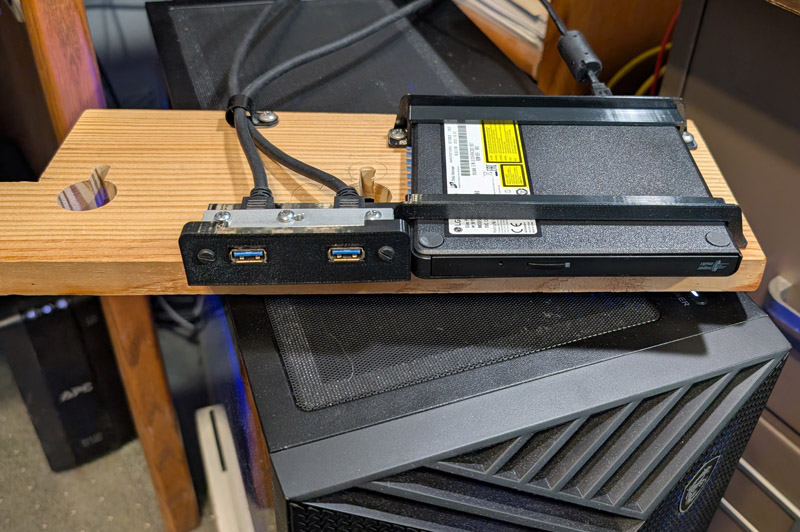
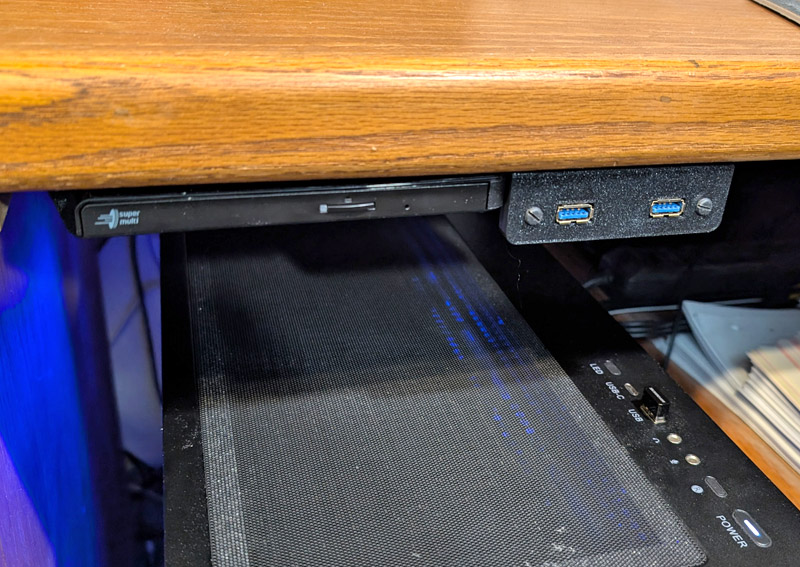
The DVD drive and the 2 USB ports are mounted to a board. This attaches to the shelf with 2 wing nuts using keyhole shaped holes. To mount, simply
place the board over the nuts, slide if forward and tighten the nuts about 1 turn each
.
I need a lot of USB ports. I didn't believe how many I use until I actually listed them for myself. I have 2 external HDs for backup, my new DVD drive, webcam, scanner, UPS, keyboard, trackball dongle, 2 Arduino devices (video scrub wheel and audio mixer), and a 3D mouse dongle for CAD. That is a total of 11 ports, plus the two front panel ports I added which are just extension cables from back panel ports.
To solve the lack of USB ports, I moved an accessory card from my old computer which provides 6 additional USB 3.0 and 2 USB C ports. I now have one USB type A port open on the rear, plus the three I now have up front.
Even though they seem to be disappearing from computers, I like having a light to show when the drives are reading or writing. I initially installed a small background program which displayed up and down arrows in the system tray showing this activity. I wanted more! The motherboard has 2 pins for a drive activity LED, but there were no wires for them in the mating connector. I added pins for those positions and ran a wire to the front of the case. Here I placed an LED assembly consisting of a small printed reflector and a couple printed brackets magnetically attached to the front case surface, behind the snap-on front plastic panel. This LED shines through the ventilation holes and is visible from almost any angle.
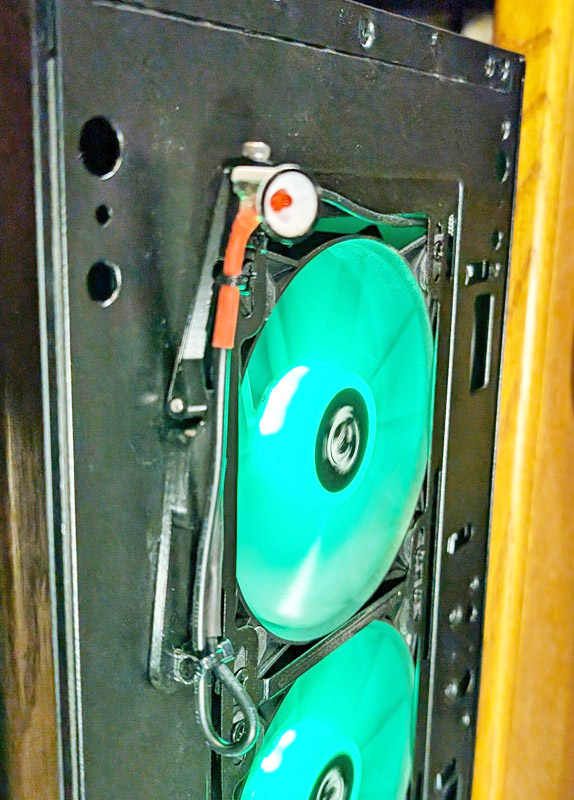
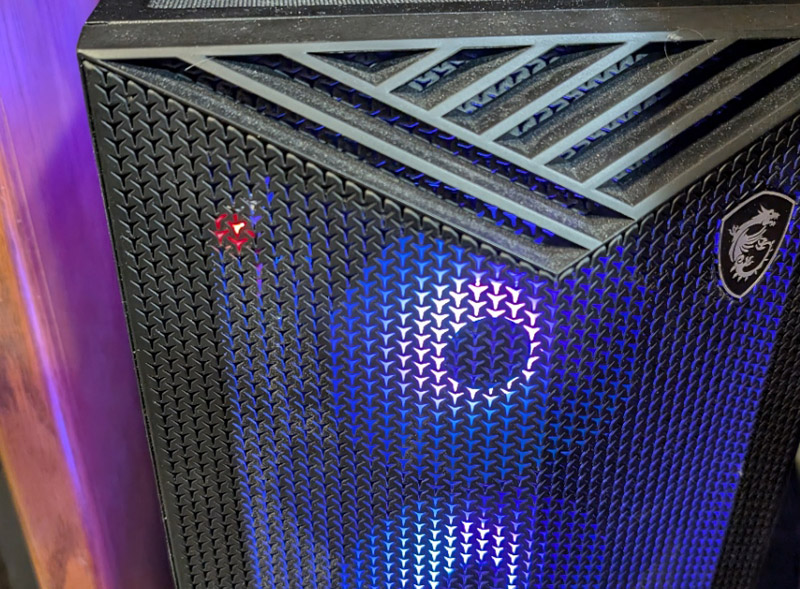
Several 3D printed parts hold the LED in a small reflector, and are attached to the case with a magnet. The
result is a small red indicator which is readily visible, but not distracting.
This system came with a non-modular power supply. I prefer the modular ones. These have sockets into which you plug only the various cables you need for your configuration. The non-modular units have all the cables they support factory wired into the supply, and any unused ones must be stored somewhere in the computer. In my case there are several unused cables which are basically just stuffed into some open space in the basement compartment. This is not a functional or performance problem, it's just not as neat, and they only show if I have the right panel off. This is one con that I will just live with despite its conflict with my principles.
The last item listed under cons is my preference for an air cooler rather than liquid cooling for the CPU. An AIO (all in one) liquid cooler, is a factory assembled total cooling system, consisting of a CPU cooling block which usually contains a pump (but sometimes the pump is in the radiator) and is permanently plumbed to a radiator. This assembly is factory filled with a coolant of water plus Glycol and possibly some additives. They are considered a limited lifetime, expendible component with an expected lifetime of around 5 years. The primary failures appear to be a gradual loss of coolant due to permeation through the hose material, and scum growing in the water and plugging very fine cooling passages,. Very few AIOs have any provision for user servicing, even topping off the coolant.
While the cooling potential for liquid systems is greater than with direct air cooling, the current air coolers are pretty well matching the capacities of today's AIOs, and are essentially maintenance free. Their only real failure point is their 1 or 2 fans, and those are inexpensive and easy to change.
An AIO installation is generally cleaner and less bulky and creates a nicer appearance, but I still prefer the simplicity and reliability of an air cooler. In preparation for that time in the future when the liquid system will fail, I investigated available air coolers and found a marvelous product. One of the highest reviewed and least expensive coolers is the Thermalright Peerless Assassin 120 cooler. In looking at that product, I discovered that one of its variants is the Digital version. This is the standard cooler with a digital display of the CPU and GPU temperatures and percentage usage. The digital version is only a few dollars more than the standard, with a total package price of $42.
I figured it was not too early to prepare for the inevitable failure of the AIO, and get the cooler (with the display) now. The display is an independent module which attaches to the top of the cooler magnetically, and there is no reason I could not use it immediately. Upon receiving the cooler, I installed the display and placed it on a flat area of the case near the front. It plugs into a USB header on the motherboard and requires a small background program. I had been trying unsuccessfully to get that exact information to display in my system tray, but the programs I tried always had something I did not like. This solves that problem! I would have paid as much for just the display, but now I have a replacement cooler ready for use when it is needed.
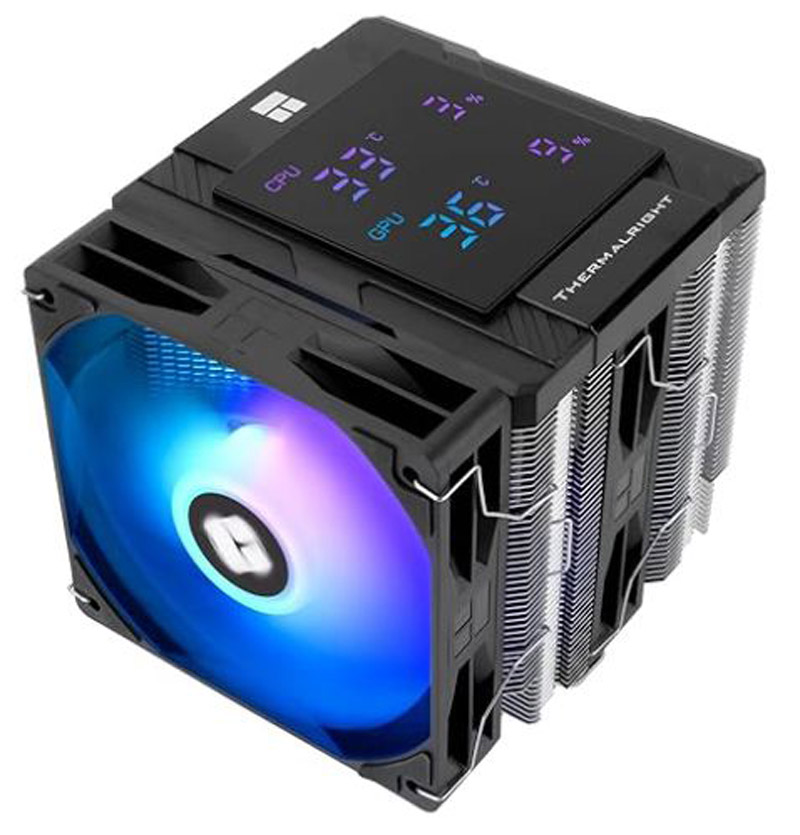
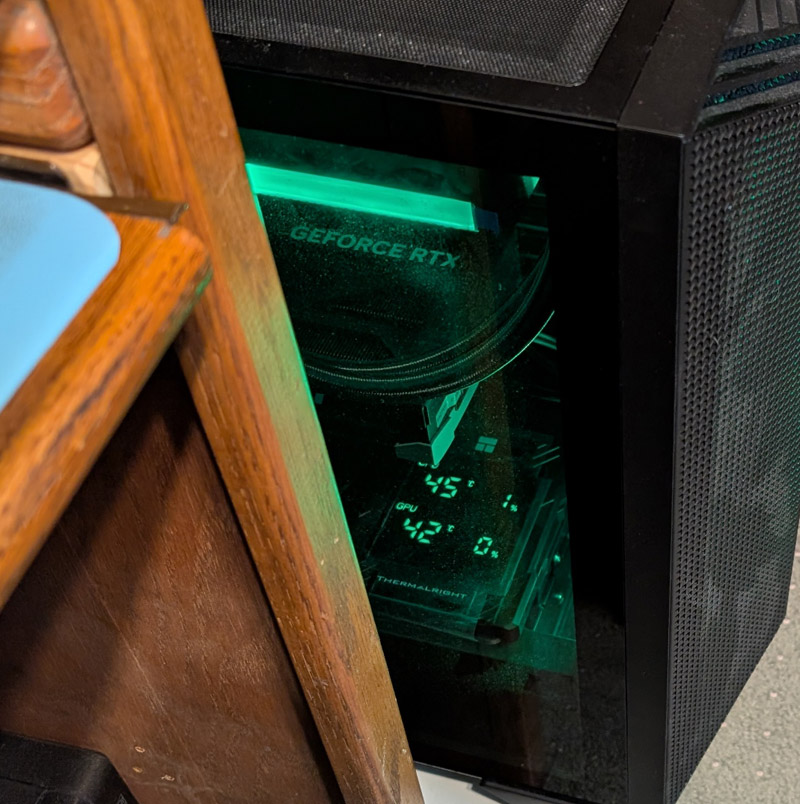
The cooler I bought is on the left, as shown by an advertising photo. Yeah, its got RGB lighting too! The right shows how easy it is for me to
just glance down, looking through the tempered glass and see the temperatures and the utilization percentages of my CPU and GPU. The
display's built in magnets hold it in place on the floor of the compartment.
System Storage:
I have quite a bit of information stored on my computer. Of course I have the operating system and the normal collection of applications, and a fair amount of stored documents and other data. Then I have a large amount of media data, including a nominal quantity of music, quite a few photos, and a large quantity of videos. This includes recordings of over 2 years worth of our local computer society meetings, and a large number of movies and other videos on my local Plex server, which allows me to view my videos on any streaming device in my home.
The computer came with a 2 TB SSD, which I am currently using for my C:\ drive, which holds my operating system and all my installed programs. In addition, I installed other drives I previously used with my old system.
I have a 2 TB SATA SSD as drive D:\ for my data such as Documents and Downloads.
For my media such as photos, videos, and music I have an E:\ drive which is a 4 TB hard drive (spinning disk).
I have a 14 TB external hard drive set as drive Y:\ which is used as a weekly backup for drive E:\, my media drive.
I have an 8 TB external hard drive set as drive Z:\ which is used as a daily backup for drives C:\ and D:\.
I need to look into optimizing the utilization of these drives, as C:\ and D:\ have quite a bit of available space, while E:\ is nearly full.
Conclusion:
So far this system has been working well and doing some of my tasks noticeably faster (it doesn't seem to speed up my Internet at all - darn). I expect that it will continue to do so and serve me reliably for a long time.
I had mentally developed a list of features I want such as a relatively high end AMD processor (CPU), a mid to higher level graphics adapter card (GPU), 32GB of RAM, and a new case to house it all. The other items to be chosen at build time. I then determined i would need budget of about $2000 give or take.
Then something disastrous happened:
Many companies dove headfirst into artificial intelligence (AI). As AI requires a lot of computing power, they all started building new giant data centers. As a result, almost the entire output of memory and related chips from the computer chip manufacturers is being bought up for these new data centers. Prices of RAM rose about 400% in 3 months, and even at that price was (and is) hard to find. Other components like graphics cards and solid state drives also became much more expensive. There went my budget!
In early December while I was at Costco, I looked at their computers. They had an MSI Aegis ZS2 gaming PC for sale which met or exceeded all my desired specs. It listed for about $2600, but was still on their Black Friday sale price of $2200. I went home and re-checked prices for just the primary components for my self built system, and they were now more than than the complete Costco system, which I went back and bought the next day! A friend of mine later priced all the components on Amazon, and discovered that I would have to spend over $3400 now to build this system myself! Thank you MSI for building this system with components you obtained prior to the massive price increases!
This is my new computer. It is built by MSI, one of the better suppliers of computer hardware and accessories,
and contains many MSI components.
A summary of my new system is:
- AMD Ryzen 9 9900X CPU, 12 core, 24 thread 4.4 GHz with boost to 5.6 GHz
- MSI All in One (AIO) liquid CPU cooling with 360mm radiator
- 32 GB T-Force DDR5 RAM, 6000 mega-transfers/sec
- MSI Geforce RTX 5080 Graphics Card with 16 GB DDR7 VRAM
- MSI 2 TB NVME Gen 4 Solid state drive (SSD)
- MSI ProB650 Motherboard
- Wi-Fi 7 and Bluetooth
- MSI 850 watt 80+Gold Power supply (non-modular)
- RGB lighting on fans and the cooling system
- MSI Full tower case
- MSI Mechanical key switch Keyboard and Gamers' mouse
The left picture shows the innards of the system. At the top is the radiator for the liquid cooling system with hoses going down to the CPU cooling block.
There are 3 fans on the radiator, 3 more bringing in cool air from the front, and one pushing air out the rear. all the fans have RGB lighting. The GPU is in the
center and the added USB card just below it. This side is normally covered by tempered glass.
The right picture shows the power supply and the storage drives in the basement compartment. In the center right is a distribution block for the fan motors
and the RGB lighting. The cable management is quite decent (except the need to store unused power supply cables next to the power supply) The
cover for this side has a fine mesh punched in about half its area for ventilation.
Of course there are pros and cons with this system.
Several pros include:
- The full system was available at a substantially lower price than if I had built it myself
- MSI has an excellent reputation and built many of the sub-assemblies of this system
- The CPU is faster and has more cores than I would have selected - a good thing!
- The GPU card is one step from the top of the line and I would have selected lower - another good thing!
- The system consists of all standard size components, with no
proprietary modules or connectors - all easily replaced or upgraded
- I had little interest in the RGB lighting, but it is flashy (pun intended).
- There is no provision for internal DVD drives
- There are too few USB ports (8 type A back panel, 1 type A, 1 type C front panel)
- There is no drive activity light
- The power supply is not modular
- My preference would have been an Air cooler instead of the liquid cooler
The cons are not major and I have easy work-arounds for most of them.
Modifications:
I immediately started making a few mods to counteract the cons I listed.
As almost no one uses DVDs any more, very few computer cases, and probably no pre-built systems still support them, but I still use them. My solution was to make a mounting board which would "quick-connect" to the bottom of the shelf above the computer. I mounted an LG external USB powered DVD/CD read/write drive to this board.
I also mounted a pair of USB 3.0 extension cables which had been attached to a machined block and a 3D printed bracket to this same board, giving me 2 additional accessible USB ports. These are "re-located" from the back panel ports, not truly "additional".
The DVD drive and the 2 USB ports are mounted to a board. This attaches to the shelf with 2 wing nuts using keyhole shaped holes. To mount, simply
place the board over the nuts, slide if forward and tighten the nuts about 1 turn each
.
I need a lot of USB ports. I didn't believe how many I use until I actually listed them for myself. I have 2 external HDs for backup, my new DVD drive, webcam, scanner, UPS, keyboard, trackball dongle, 2 Arduino devices (video scrub wheel and audio mixer), and a 3D mouse dongle for CAD. That is a total of 11 ports, plus the two front panel ports I added which are just extension cables from back panel ports.
To solve the lack of USB ports, I moved an accessory card from my old computer which provides 6 additional USB 3.0 and 2 USB C ports. I now have one USB type A port open on the rear, plus the three I now have up front.
Even though they seem to be disappearing from computers, I like having a light to show when the drives are reading or writing. I initially installed a small background program which displayed up and down arrows in the system tray showing this activity. I wanted more! The motherboard has 2 pins for a drive activity LED, but there were no wires for them in the mating connector. I added pins for those positions and ran a wire to the front of the case. Here I placed an LED assembly consisting of a small printed reflector and a couple printed brackets magnetically attached to the front case surface, behind the snap-on front plastic panel. This LED shines through the ventilation holes and is visible from almost any angle.
Several 3D printed parts hold the LED in a small reflector, and are attached to the case with a magnet. The
result is a small red indicator which is readily visible, but not distracting.
This system came with a non-modular power supply. I prefer the modular ones. These have sockets into which you plug only the various cables you need for your configuration. The non-modular units have all the cables they support factory wired into the supply, and any unused ones must be stored somewhere in the computer. In my case there are several unused cables which are basically just stuffed into some open space in the basement compartment. This is not a functional or performance problem, it's just not as neat, and they only show if I have the right panel off. This is one con that I will just live with despite its conflict with my principles.
The last item listed under cons is my preference for an air cooler rather than liquid cooling for the CPU. An AIO (all in one) liquid cooler, is a factory assembled total cooling system, consisting of a CPU cooling block which usually contains a pump (but sometimes the pump is in the radiator) and is permanently plumbed to a radiator. This assembly is factory filled with a coolant of water plus Glycol and possibly some additives. They are considered a limited lifetime, expendible component with an expected lifetime of around 5 years. The primary failures appear to be a gradual loss of coolant due to permeation through the hose material, and scum growing in the water and plugging very fine cooling passages,. Very few AIOs have any provision for user servicing, even topping off the coolant.
While the cooling potential for liquid systems is greater than with direct air cooling, the current air coolers are pretty well matching the capacities of today's AIOs, and are essentially maintenance free. Their only real failure point is their 1 or 2 fans, and those are inexpensive and easy to change.
An AIO installation is generally cleaner and less bulky and creates a nicer appearance, but I still prefer the simplicity and reliability of an air cooler. In preparation for that time in the future when the liquid system will fail, I investigated available air coolers and found a marvelous product. One of the highest reviewed and least expensive coolers is the Thermalright Peerless Assassin 120 cooler. In looking at that product, I discovered that one of its variants is the Digital version. This is the standard cooler with a digital display of the CPU and GPU temperatures and percentage usage. The digital version is only a few dollars more than the standard, with a total package price of $42.
I figured it was not too early to prepare for the inevitable failure of the AIO, and get the cooler (with the display) now. The display is an independent module which attaches to the top of the cooler magnetically, and there is no reason I could not use it immediately. Upon receiving the cooler, I installed the display and placed it on a flat area of the case near the front. It plugs into a USB header on the motherboard and requires a small background program. I had been trying unsuccessfully to get that exact information to display in my system tray, but the programs I tried always had something I did not like. This solves that problem! I would have paid as much for just the display, but now I have a replacement cooler ready for use when it is needed.
The cooler I bought is on the left, as shown by an advertising photo. Yeah, its got RGB lighting too! The right shows how easy it is for me to
just glance down, looking through the tempered glass and see the temperatures and the utilization percentages of my CPU and GPU. The
display's built in magnets hold it in place on the floor of the compartment.
System Storage:
I have quite a bit of information stored on my computer. Of course I have the operating system and the normal collection of applications, and a fair amount of stored documents and other data. Then I have a large amount of media data, including a nominal quantity of music, quite a few photos, and a large quantity of videos. This includes recordings of over 2 years worth of our local computer society meetings, and a large number of movies and other videos on my local Plex server, which allows me to view my videos on any streaming device in my home.
The computer came with a 2 TB SSD, which I am currently using for my C:\ drive, which holds my operating system and all my installed programs. In addition, I installed other drives I previously used with my old system.
I have a 2 TB SATA SSD as drive D:\ for my data such as Documents and Downloads.
For my media such as photos, videos, and music I have an E:\ drive which is a 4 TB hard drive (spinning disk).
I have a 14 TB external hard drive set as drive Y:\ which is used as a weekly backup for drive E:\, my media drive.
I have an 8 TB external hard drive set as drive Z:\ which is used as a daily backup for drives C:\ and D:\.
I need to look into optimizing the utilization of these drives, as C:\ and D:\ have quite a bit of available space, while E:\ is nearly full.
Conclusion:
So far this system has been working well and doing some of my tasks noticeably faster (it doesn't seem to speed up my Internet at all - darn). I expect that it will continue to do so and serve me reliably for a long time.
R. S. Mason January 2026